πŸ‹οΈ

GymLog

Your personal training companion

Welcome!

What should we call you?

πŸ”’

All GymLog data β€” your sessions, training types, and profile β€” is stored locally on this device only. Nothing is ever sent to a remote server or shared with anyone. Your data stays yours.

Today

Exercise

Start and track your training sessions

Select Session Type
Select Subtype Β· optional
πŸ‹οΈ

Strength Training

Today Β· 09:00

Elapsed Time
00:00:00

Exercises

Session types & exercise library

Reports

Your training history

0
Total Sessions
0h
This Week
β€”
Top Type
Session History

Settings

Preferences & app info

Units

Choose your preferred units

Workout Plans

Control how plans interact with sessions

Sessions

Customise what you see during a session

Reports

Customise what you see in your training history

Progression Targets

Automatic weight increase suggestions

When adding a set during a session, the app checks your history for that exercise. If the criteria above are met, the weight field is pre-filled with a suggested increase and a green hint is shown. You can always override the value.

Only applies to strength exercises with weight tracking enabled.

Data

Import, export and manage your data

About

πŸ‹οΈ

GymLog

version 2.0 alpha

v2.0 Ξ± Navigation, Train & Profile
  • Added a global sidebar drawer accessible via the ☰ hamburger button β€” navigate between Exercise, Train, Profile, and future sections without leaving your current view
  • The GymLog wordmark appears beside the hamburger on all sidebar-accessible views, keeping the app identity consistent throughout
  • Added the Train section β€” start a Bulk, Cut, or Neither training phase with an optional target duration; the active phase card tracks the current day and shows a progress indicator against your goal
  • Log your body weight within an active phase; each entry shows an up/down delta against the previous weigh-in so you can track direction at a glance
  • Ending a phase archives it to a phase history list showing start and end dates, total duration, and the weight change over the phase
  • Added the Profile section β€” edit your name, set your height, select up to 12 training goals (Hypertrophy, Strength, Endurance, Fat Loss, and more), and view live stats: Total Workouts, Weekly Streak, and PRs Achieved
  • Tap your profile avatar to upload a photo (JPEG, PNG, WebP, GIF, or HEIC) β€” displayed in both the Profile page and the sidebar header; falls back to initials when no photo is set
  • Added Pause / Resume button during active sessions β€” freezes the timer without ending the session so rest periods don't inflate your logged duration
  • Added a Cancel Session confirmation modal to prevent accidentally discarding a session in progress
  • Added a finish guard β€” finishing a session with no exercises logged now asks you to confirm before saving an empty record
  • Added Export as Workout Plan in Reports β€” expand any session's exercise log and tap the button to open the plan editor pre-filled with those exercises, ready to save as a reusable plan
  • Added Increase Plates option in Progression Targets β€” when using plates mode the recommendation can suggest adding a full plate rather than a kg/lbs increment
v1.8 Interactive Feature Guides
  • Added a Help page in Settings with a swipeable carousel of animated feature guides β€” covering Session Types & Subtypes, Workout Plans, Copy Previous Set, and Progression Targets
  • Each guide shows a full GIF walkthrough alongside a plain-English description of the feature and how to use it
  • Dot indicators track your position in the carousel and reset to the first slide each time you open Help
v1.7.5 Unit Convertor & Bug Fixes
  • Added inline unit convertor in the Log Set modal β€” converts lbs β†’ kg when kg is selected as your weight unit, and kg β†’ lbs when lbs is selected; converts mi β†’ km or km β†’ mi for distance exercises based on your distance unit setting
  • Convertor is hidden in Plates mode and only shown for exercises with weight or distance tracking enabled
  • Added exercise search bar on the Exercises library page and inside the Add Exercise picker during active sessions β€” searches filter in combination with the existing Strength, Cardio, and User Added pills
  • Added a New Exercise button inside the Add Exercise picker during a running session β€” opens the New Exercise form and returns to the picker with the new exercise visible and selectable
  • Added edit support for user-added Session Types, Subtypes, and Exercises β€” tap the ✏️ button on any custom item to update its name, emoji, or other details
  • Added Export on Session Finish toggle in Settings β†’ Data β€” when on, the Export dialog opens automatically each time you finish a session
  • Workout Plan dropdown on the Home screen now auto-selects the plan assigned to the chosen Session Type or Subtype; manually changing the dropdown overrides the auto-load, and selecting None prevents any plan from loading even if one is assigned
  • Fixed long notes being unreadable in the Notes viewer on the Reports screen β€” the note body now scrolls within a capped area while the session header and action buttons remain visible at all times
v1.7 Progression Targets & Session Set Logging
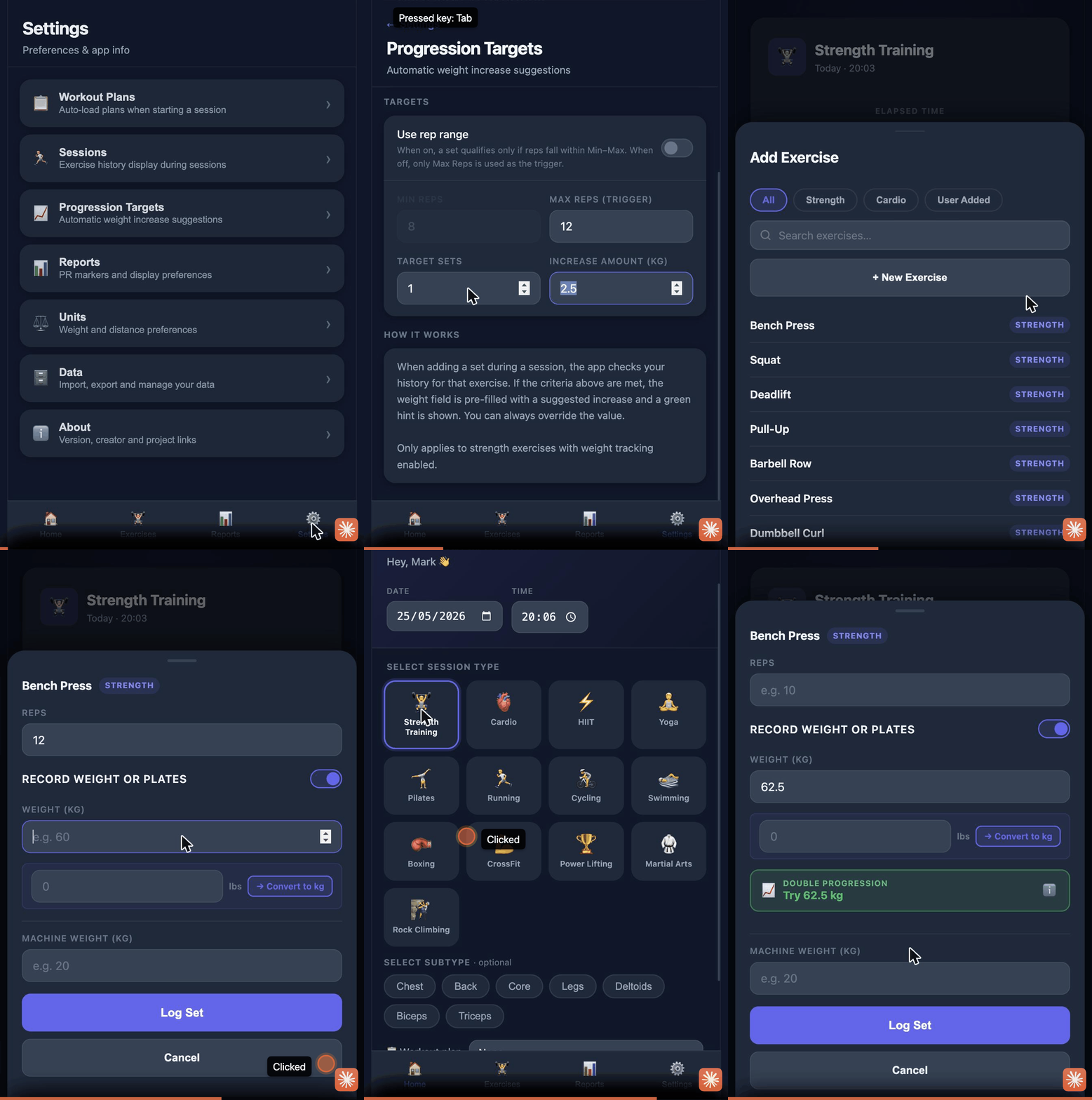
  • Added Progression Targets β€” automatically suggests the next weight to use when the Log Set modal is opened, based on your recent performance for that exercise
  • Two progression methods available: Double Progression (one qualifying session triggers a recommendation) and the 2-for-2 Rule (two consecutive qualifying sessions required for a more conservative increase)
  • Configurable targets: set your Min and Max rep range, the number of qualifying sets required per session, and the weight increment to suggest
  • Optional rep range mode β€” when enabled, a set only qualifies if reps fall within the Min–Max range rather than simply hitting the Max; Min Reps input is greyed out when this is off
  • Recommendation banner appears below the Weight/Plates field in the Log Set modal in green, with the suggested weight pre-filled and an ℹ️ button explaining why the recommendation was made
  • Added "Copy previous set values" toggle in Settings β†’ Sessions β€” when on, the Log Set modal pre-fills reps, weight (or plates), and machine weight from the most recently logged set for that exercise
  • Copy previous set applies within the current active session only and correctly carries plates mode state across sets
v1.6 Workout Plans & Customisations
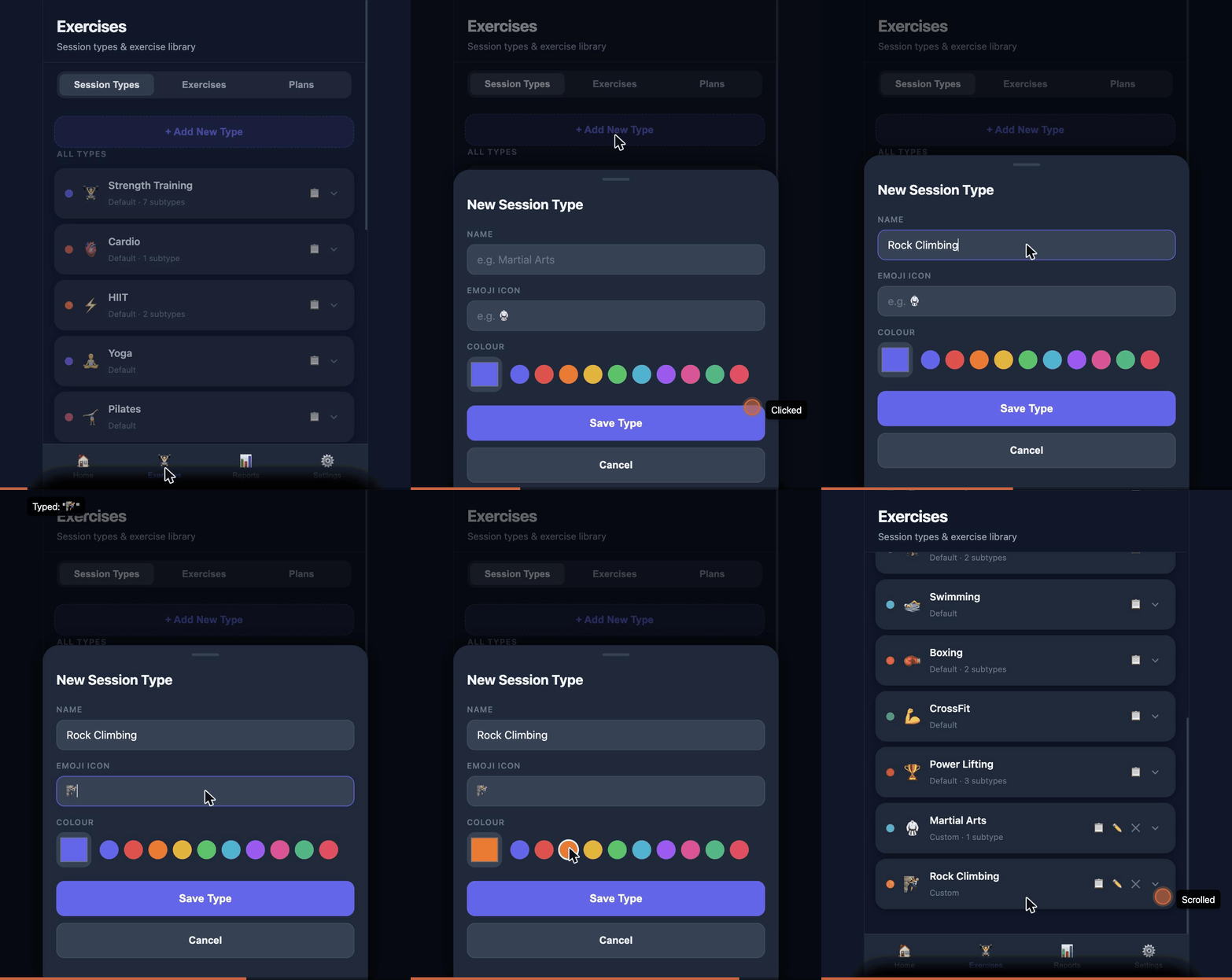
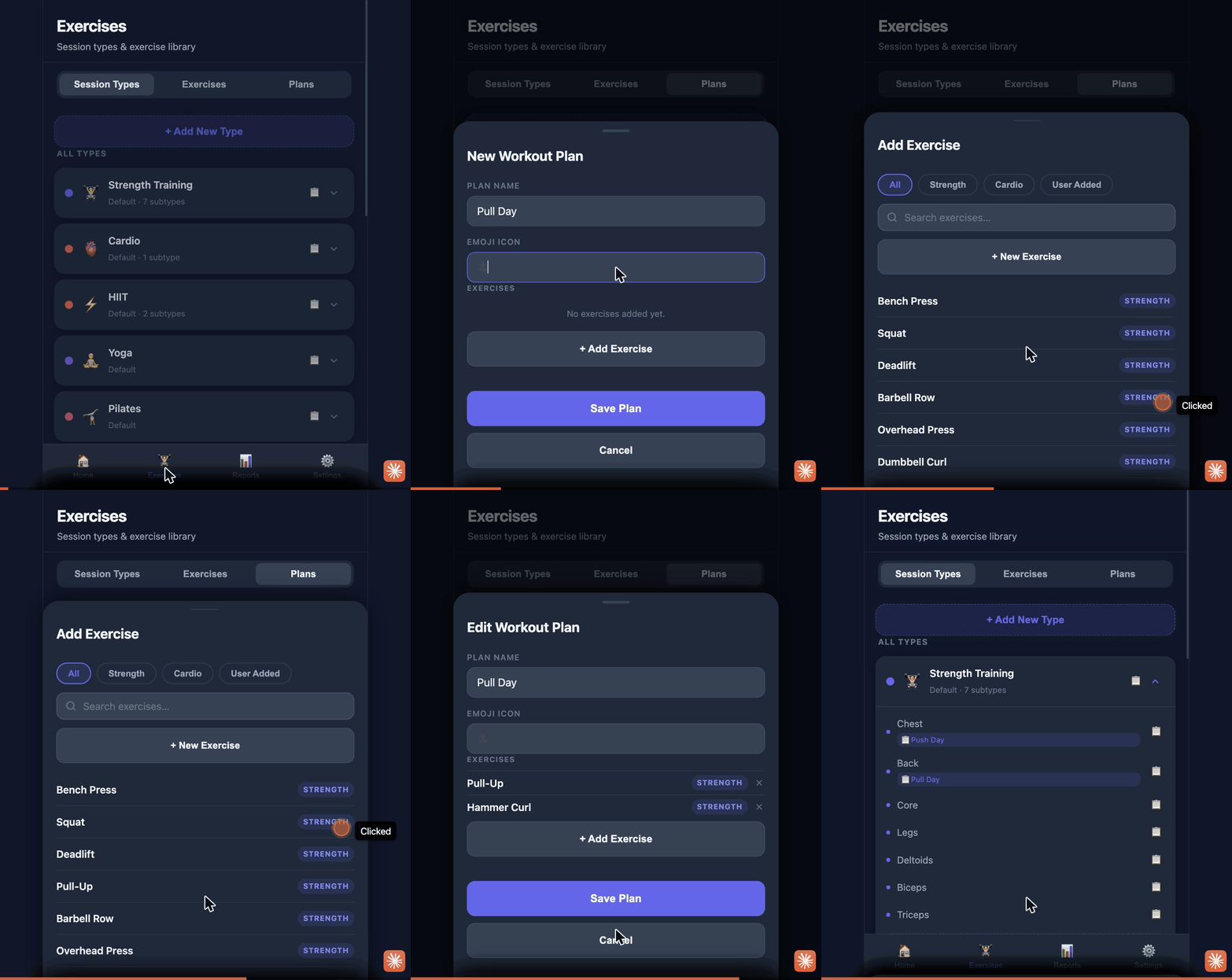
  • Added Workout Plans β€” create named collections of exercises with an emoji icon and assign them to any Session Type or Subtype
  • Plans are managed from the new Plans tab on the Exercises screen β€” add, edit, or delete plans and their exercise lists at any time
  • Auto-load assigned plans when starting a session, with a per-type/subtype toggle to enable or disable auto-load independently; subtype plan takes priority over type plan
  • Global auto-load toggle in Settings β†’ Workout Plans to turn the feature on or off without removing individual assignments
  • Load a workout plan from the Home screen before starting a session via the plan selector dropdown
  • Load a plan into any running session using the πŸ“‹ Plan button β€” already-added exercises are skipped silently
  • Session History now allows both "Show last session's result" and "Show Personal Record" to be selected together; selecting "Don't show" deselects both
  • When the last session result and the PR are the same set, a single combined πŸ†πŸ• row is shown instead of duplicating the value
  • PDF export now includes πŸ† PR markers next to the personal-record set for each exercise, controlled by the Show PR markers toggle in Settings β†’ Reports
  • Added a "User Added" filter pill in the Exercise Library to view only custom exercises, combinable with the Strength and Cardio filters
v1.5 Report Editing & Rory Bug Fix
  • Added ability to edit any completed session from Reports history β€” update date, start time, duration, session type and subtype after the fact
  • Edit individual exercises within a completed session: swap an exercise, remove an exercise (with confirmation when sets are logged), or add new exercises
  • Edit, delete or add sets for each exercise within a completed session β€” set values pre-populate the Log Set modal for easy correction
  • Edited sessions display an ✏️ Edited badge on their session card so it's clear the record was amended
  • Added exercise history hint (Last Session / Personal Record) on exercise cards during active sessions β€” configurable in Settings β†’ Sessions
  • Fixed bug where the Add Exercise picker was obscured behind the Edit Session modal and could not be interacted with
  • Fixed bug where closing Edit Session left the Add Exercise picker overlaid on the Reports screen
v1.4.5 Weight Recording & Rory Enhancements
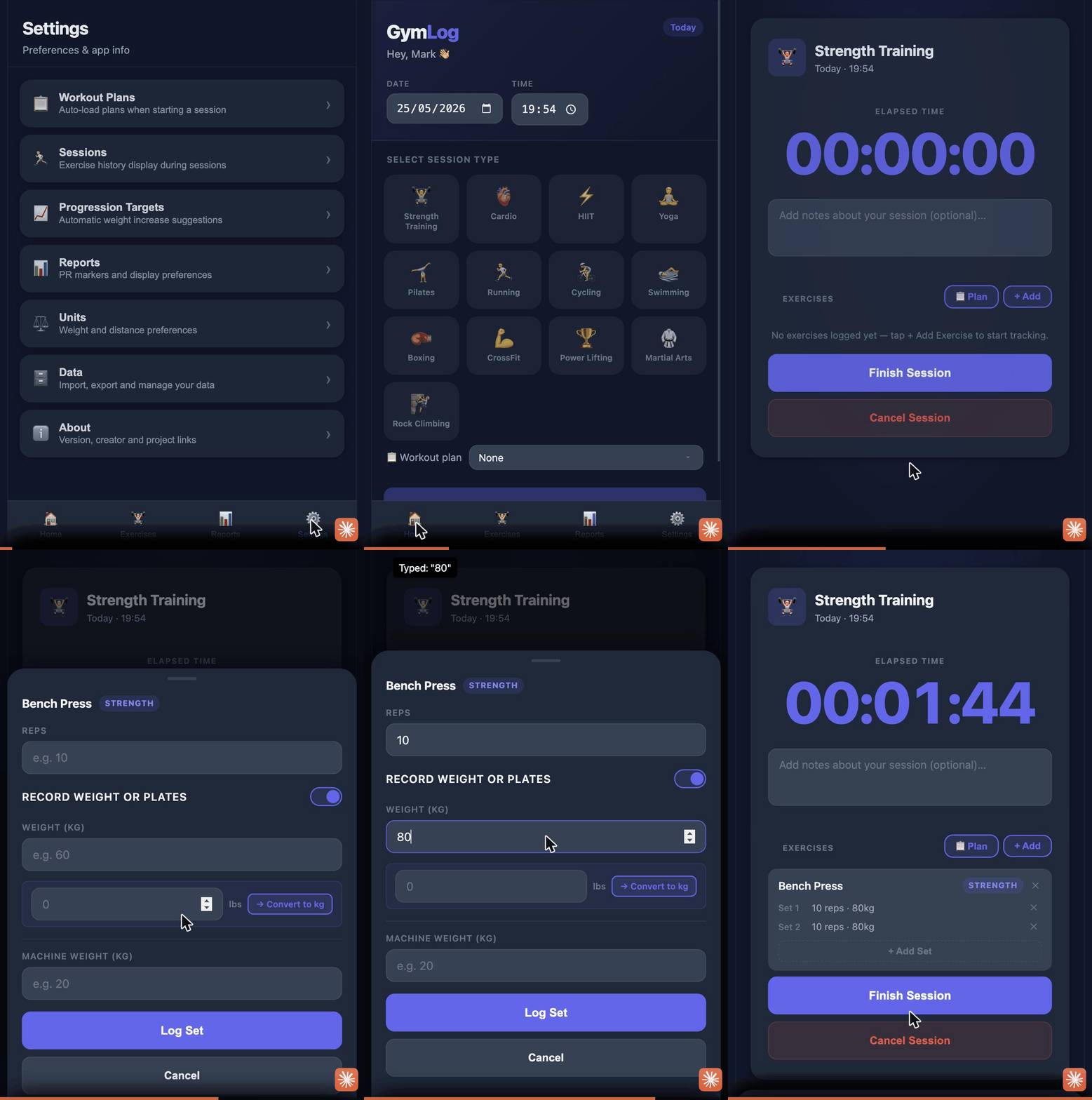
  • Added Weight / Plates toggle on the Log Set modal for strength exercises β€” switch between recording kg/lbs and number of plates per exercise
  • Added optional Machine Weight field for exercises with weight tracking β€” records the pre-set weight on the machine and is retained across sets for that exercise
  • Machine Weight field is automatically hidden when Plates mode is selected
  • Prevented duplicate exercises being added to the same active session
  • Added ability to remove an exercise from an active session, with a confirmation prompt when sets have already been logged
v1.4 Bug Fixes & Test Automation
  • Fixed filter pill text misalignment in Exercises view caused by native browser button rendering
  • Fixed filter pill border clipping in Exercises view caused by overflow container collapsing top padding
  • Fixed horizontal scrollbar appearing on filter pills in the Add Exercise modal
  • Disabled Export and Clear History buttons on Reports when no sessions exist
  • Added Playwright E2E test suite with GitHub Actions CI on pull requests
v1.3 Exercise Library & Inline Logging
  • Added Exercise Library with 30 default exercises
  • Added ability to create custom exercises
  • Added inline exercise and set logging during active sessions
  • Session history now shows exercise summaries in Reports
  • JSON and PDF exports include exercise data
v1.2 Settings & Data Management
  • Added Settings functionality
  • Added functionality to clear all stored data
v1.1 Exports & Subtypes
  • Added Data Export functionality
  • Added default Session Subtypes
  • Added ability to add Session Subtypes
v1.0 Initial Release
  • Initial release
  • Added ability to create Sessions
  • Added default Session Types
  • Added ability to add Sessions and new Session Types
  • Added basic Report functionality

πŸ”’ All GymLog data is stored locally on this device only. Nothing is ever sent to a remote server or shared with anyone.

✦ This app was built and iterated with Claude Code as part of a personal journey to learn AI-assisted development tools. Most features, fixes, and design decisions were explored collaboratively with Claude.

πŸ™

Rory

Testing, bug reports & improvements throughout development β€” including suggestions and enhancements that shaped the Workout Plans feature.

πŸ‹οΈ

Mark

For the Progression Targets feature concept β€” bringing real evidence-based training methodology (Double Progression and the 2-for-2 Rule) into GymLog and making the app genuinely useful for structured strength programming.

Help

Feature guides

Train

Bulk & Cut phase tracker

Nutrition

Track your food intake

πŸ₯—

Coming Soon

Nutrition tracking is on the roadmap for a future update. Stay tuned!

Insight

Training analytics & trends

0 week streak
0 Active Days
0 Workouts / Week

Max weight per session type Β· last 6 months

Max distance per session type Β· last 6 months

πŸ’ͺ

Coming Soon

Muscle group distribution analytics will be available in a future update.

Profile

Your details & goals

0 Total Workouts
0 Week Streak
0 PRs Achieved